
Building a Codebook
Learn how to create, edit, organize and import coding categories for qualitative research in Academly.

A codebook defines the categories used to analyze qualitative data. Academly provides a structured workspace for creating, editing and organizing these categories.
What this section is about
A clear coding scheme makes qualitative analysis more consistent. Each category should describe what belongs in that category and provide enough guidance for you to apply it consistently across your material.
When you should use a codebook
- When you are preparing qualitative data for coding
- When you need to define coding categories
- When you want to use categories created in Research Setup
- When you want to edit or reorganize an existing coding scheme
- When you need to import or export categories using CSV
How to create a codebook
Open Codebook
Go to Qualitative Research and open the Codebook area.
Create a codebook
Enter a title for the codebook and create it.
Add categories
Create categories and add the information needed to describe how each category should be used.
Review the category definitions
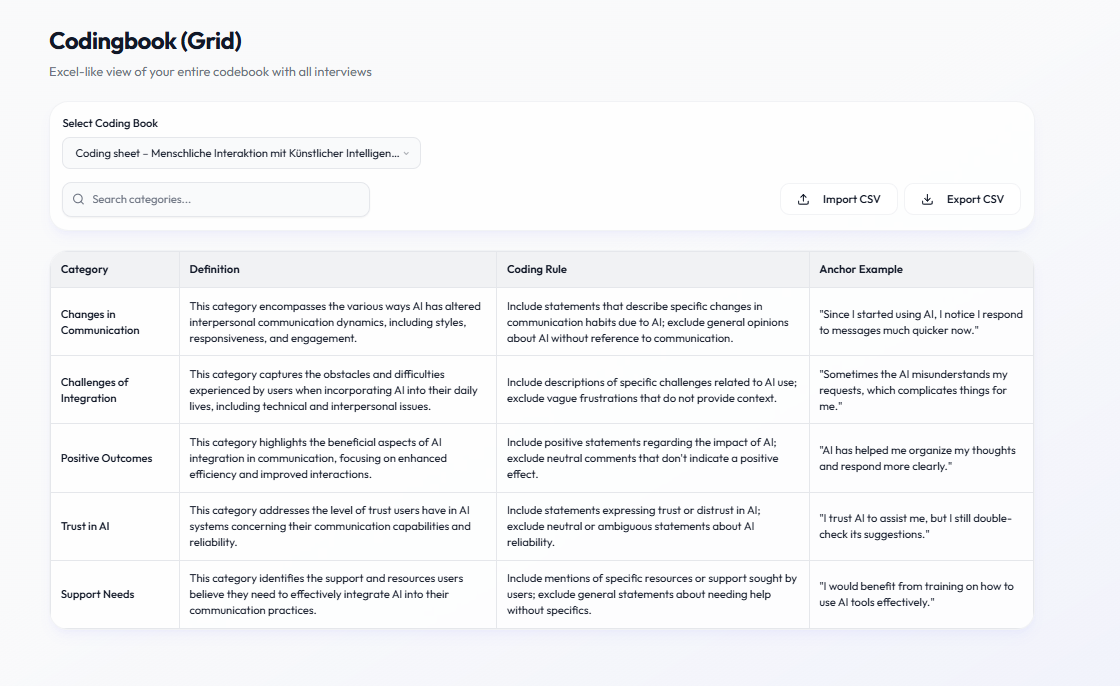
Check the name, definition, coding rule and anchor example for each category.
Organize the codebook
Edit, reorder or remove categories as your coding scheme develops.
Save your changes
Make sure the current codebook structure is saved before you begin coding interviews.
Using categories from Research Setup
If you created categories during Research Setup, you can use them as a starting point instead of building the entire codebook manually.
Category fields
- Name: The name of the category
- Definition: What the category represents
- Coding Rule: Guidance for deciding when the category should be applied
- Anchor Example: An example that demonstrates the intended meaning of the category
Importing and exporting
- Export your current codebook as a CSV file
- Import categories from a compatible CSV file
- Keep an exported copy before making major changes to an established codebook
CSV structure
A codebook CSV can contain the columns Category, Definition, Coding Rule and Anchor Example.
Important notes
Use clear category definitions and review whether categories overlap unnecessarily. Anchor examples can help improve consistency during coding. Keep a backup before making major structural changes to an existing codebook.
Related sections
- Research Setup
- Auto-Coding
- Analysis & Summaries