
Dashboard Overview
Learn what you can see on the Academly Dashboard and how to use it to keep track of your thesis work.

The Dashboard is the main overview of your Academly workspace. It shows important information about your thesis, your progress and your recent work in one place.
What this section is about
The Dashboard gives you a quick overview of your current thesis status. Depending on the data available in your workspace, it can show writing progress, thesis information, literature statistics and research activity.
When you should use this
- When you start a new working session
- When you want to check your thesis progress
- When you want a quick overview of your workspace
- When you want to review recent activity
How it works
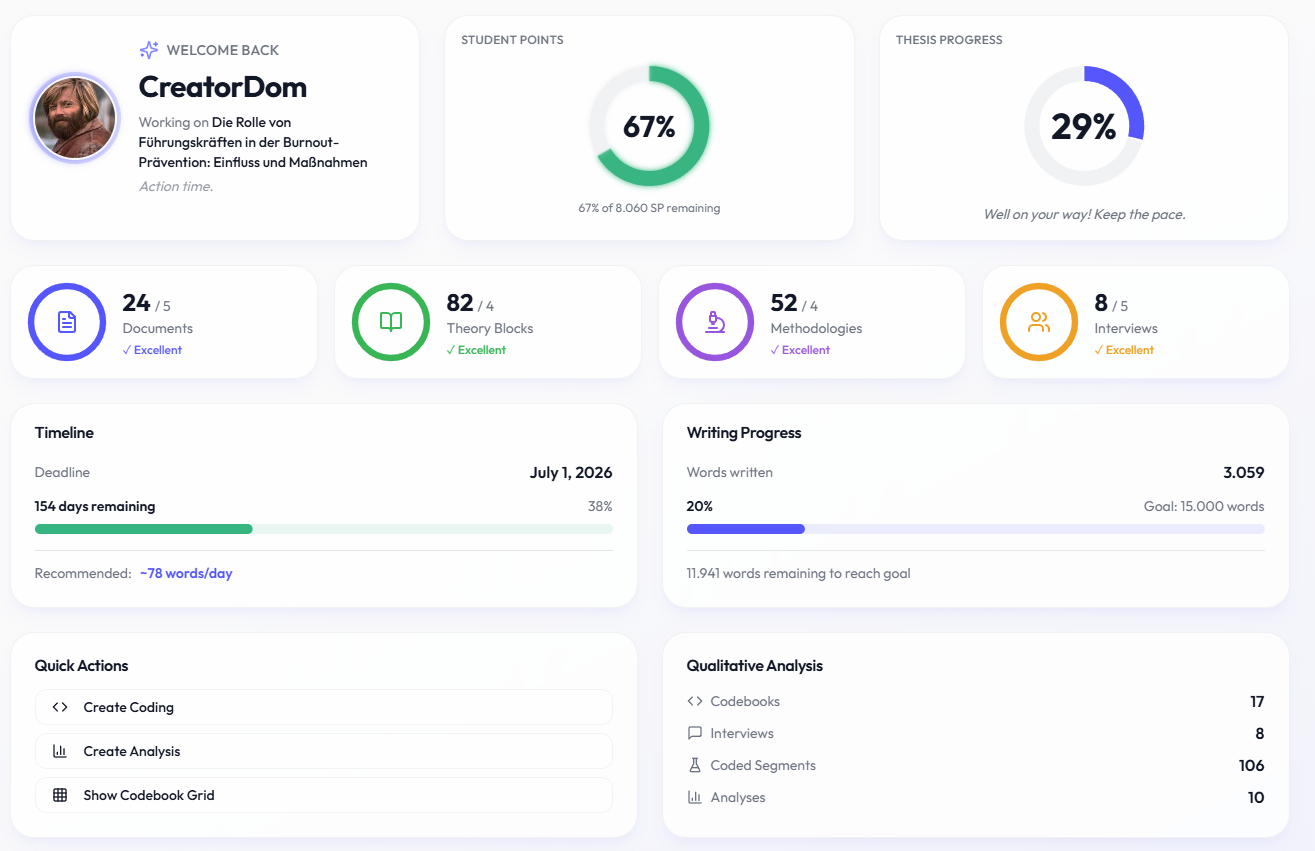
The Dashboard is divided into several cards and overview areas. The information shown depends on your thesis and the features you are using.
- Thesis Progress: Shows the progress of your selected thesis and your current word count compared with the target word count.
- Timeline: Shows information related to your thesis deadline and remaining time when a deadline is available.
- Literature Overview: Gives you an overview of documents and research material in your workspace.
- Writing Progress: Shows the current status of your thesis writing progress.
- Qualitative Research: If you use the qualitative research tools, related statistics may also appear on the Dashboard.
- Recent Activity: Shows recent work and changes in your Academly workspace.
Important notes
Dashboard values are calculated from information stored in other parts of Academly. The Dashboard itself does not store your thesis, sources or research data.